Quick Order Tool Pimoroni Customs New From Pimoroni
Register Login
Register Login

Delivery region

Choose your delivery region to set your pricing and currency. All prices exclude VAT and other local taxes.

/
Your order is empty
Raspberry PiPicoPimoroniAdafruitBreakoutsBadgewareSmart HomeToolsNew Popular
DisplaysCamerasLED StripsComponentsSensorsEnvironmentalRoboticsAudioRetro/ArcadeYukonFeatherTinyFXMerchandise

Departments

New Popular
Raspberry Pi
Pico
Pimoroni
Adafruit
Breakouts
Badgeware
Smart Home
Tools
Displays
Cameras
LED Strips
Components
Sensors
Environmental
Robotics
Audio
Retro/Arcade
Yukon
Feather
TinyFX
Merchandise
  • 58,698 reviews rated 4.8 out of 5!
  • Volume pricing save on larger orders
  • Credit accounts flexible payment options
  • Expert support by email or phone

Search

Filter

  •  
  •  
  •  
  •  
  •  
  •  
  •  
  •  
  •  
  •  
  •  
  •  
  •  
  •  

Audio

Speaker for micro:bit

Speaker for micro:bit - The MonkMakes Speaker for micro:bit is a neat little amplified speaker that connects to your micro:bit using alligator clips. Speaker for micro:bit Speaker for micro:bit

We no longer stock this product

It's sad to say goodbye but sometimes we have to retire products to make way for new things.

Speaker for micro:bit

Video introduction

The MonkMakes Speaker for micro:bit is a neat little amplified speaker that connects to your micro:bit using alligator clips.

Features

  • Amplified output
  • LED ‘power on’ indicator
  • Reverse polarity protection
  • Compatible with micro:bit v1 and v2!

Getting Started

Connecting to your micro:bit

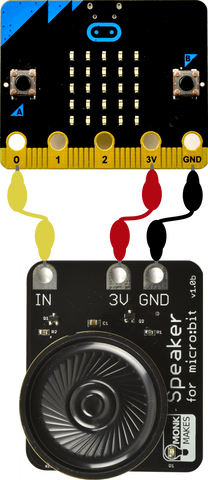
Connect the Speaker to the micro:bit as shown below. When attaching the alligator clips to the micro:bit, make sure that the clips are perpendicular to the board so that they are not touching any of the neighbouring connectors on the micro:Bit edge connector.
HEX File

The quickest way to try out your speaker is to DOWNLOAD THIS HEX FILE and then copy it onto your micro:bit. Press Button A to hear a tune being played.

JavaScript Blocks Editor

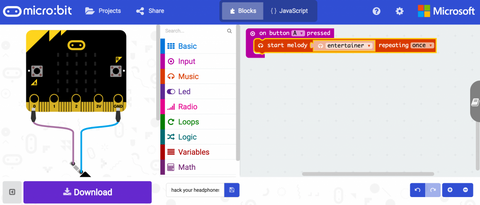
Visit the Blocks Editor in your browser and then from the input section add an on button A pressed block then from the music section add a start melody block and select the tune you want to play (in this case, entertainer).

Click Download and then copy the file onto your micro:bit.

You can also open the project in the Blocks Editor by clicking on the image below.
You can also make a simple musical instrument, using this tutorial: https://makecode.microbit.org/projects/hack-your-headphones/code

MicroPython

Paste the following code into the Python window and then Download the file and copy it onto your your micro:bit

from microbit import *
import music

while True:
if button_a.was_pressed():
music.play(music.ENTERTAINER)

When you press button A you will hear the tune “The Entertainer” play through the speaker.

Guides & tutorials

Customer reviews

Trade newsletter

Join our trade newsletter and we'll keep you up to date with new product launches.

The Good Ship Pimoroni

We've been designing and making electronics in Sheffield since 2012, with our own manufacturing and fulfilment under one roof.

Our business store makes it easy to buy Pimoroni, Raspberry Pi, micro:bit, Adafruit, SparkFun and more in volume, with competitive pricing and support from people who know the products. Need something specific? Drop us a line.

Useful links (we hope)

How to order Quick order tool Contact our business team Pimoroni customs Our retail shop

Pimoroni Ltd.

Unit 1, Parkway Business Park, Parkway Drive, Sheffield, S9 4WN, United Kingdom
Registered in England and Wales Company №: 07510759 VAT Reg №: GB140870721
Terms & Conditions Privacy Policy